
TL;DR. Last week I promised, on the record, to write up the tools I've made with AI one at a time and say whether Claude for Teachers made each one redundant, matched it, or missed it. The feedback pipeline goes first: it turns what I say out loud while reading a student's essay into margin comments in their Word document. I'm a TOK teacher, not a developer, and I've made this at least three times in 11 months. In this case Claude for Teachers misses it, and the reason my version survives the platform is a constraint, not a feature.
Here is what it looks like from the outside. I open a student's TOK essay, script on the left half of the screen, a record button pulsing on the right, and instead of typing I talk. "This paragraph implies the map is neutral, and there's no asking who drew it. How do you think that matters?" When the stack is done, each student's document comes back with margin comments in the right places: every one anchored to the exact sentence I was reacting to, rephrased into English suitable for the audience, usually formulated as a question, and held to thirty words because I can have a habit of overexplaining my feedback. The first overall comment is nearly always positive. That's a rule in the system, not a habit I trust myself to keep by essay fifteen.
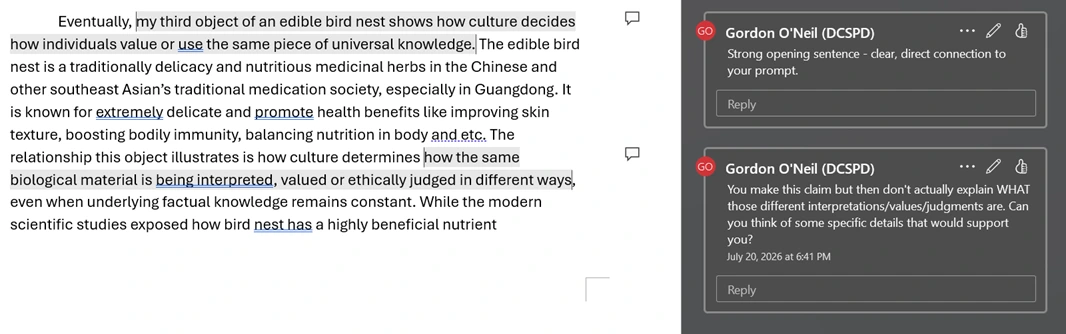
What the student gets back: my spoken reactions, softened and anchored to their sentences. Name redacted — it's a real essay.
One important caveat is the machine never reads text before I do. It never grades. It never invents a comment or question. Every thought in those margins started from my engaging with the work. I've written about how crucial it is for students to trust feedback, and that's why I do it this way: to ensure there is trust.
Feedback tooling is normally what edtech companies build. MagicSchool and Diffit have been selling it to schools for two years with product teams behind them, and Anthropic just created a platform with official plugins for both of them. I teach Theory of Knowledge in Shanghai, and my product team is my old laptop running Linux in the corner of my living room.
Three generations
As much as I'd love for feedback to be faster, that wasn't really my main goal. It was to make the process less exhausting. I like reading student work, but there is sometimes a chasm between what I think while reading and what I can bear to type by the fifteenth script of twenty-five. The thought arrives blunt: Not specific enough. This object could be any heart rate monitor on earth. The version the student needs takes another ninety seconds of rephrasing, and by script fifteen those ninety seconds are where kindness goes to die. I wrote about the sorting last week; this is the story of the machinery underneath it.
The pipeline exists in three generations, and I only ever planned one of them. Generation one was basically me with a Word doc open, pressing speech-to-text on ChatGPT for the web, and recording verbatim sentences from the student's work alongside my thoughts on that passage. I then had ChatGPT create a Word macro that converts tables to margin comments: paste in a two-column table, anchor phrase on the left, comment on the right, and it drops each comment into the margin at the matching sentence. The macro did the placing. I still did quite a bit of iterating.
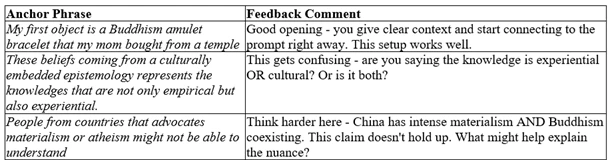
Generation one: the table my Word macro turns into margin comments. I still typed every word of these.
Generation two arrived on the twelfth of January this year, when I spent an afternoon feeding spoken commentary through Claude and got nine finished feedback documents out the other side. The same day, I wrote the exact requirements into a workflow document whose opening line is a small confession: "GOAL: ONE-SHOT EXECUTION — NO ITERATIONS." You only arrive at that goal after an afternoon of iterations. The document reads unglamorously: the exact table headings the macro checks for, a hundred-character limit on anchor phrases because longer ones crash the macro, the rule about the first comment being positive. It is also why the workflow has run much cleaner since.
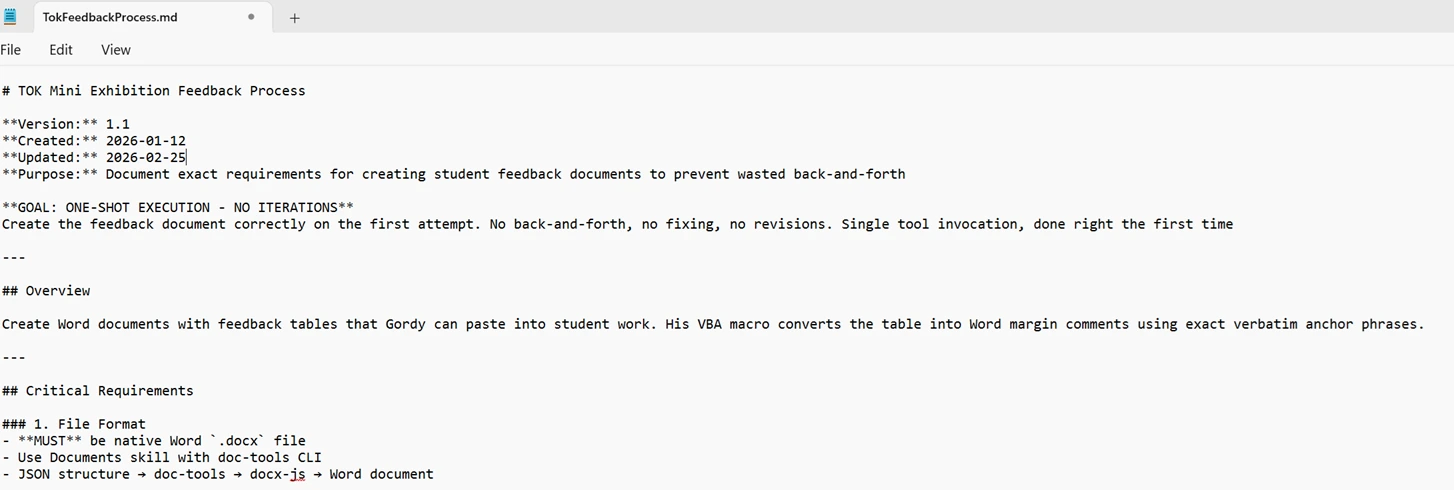
The workflow contract, written the same day nine feedback documents proved the process. You only write that first line after an afternoon of iterations.
Generation three began a couple of weeks later, when the chat workflow became an app.
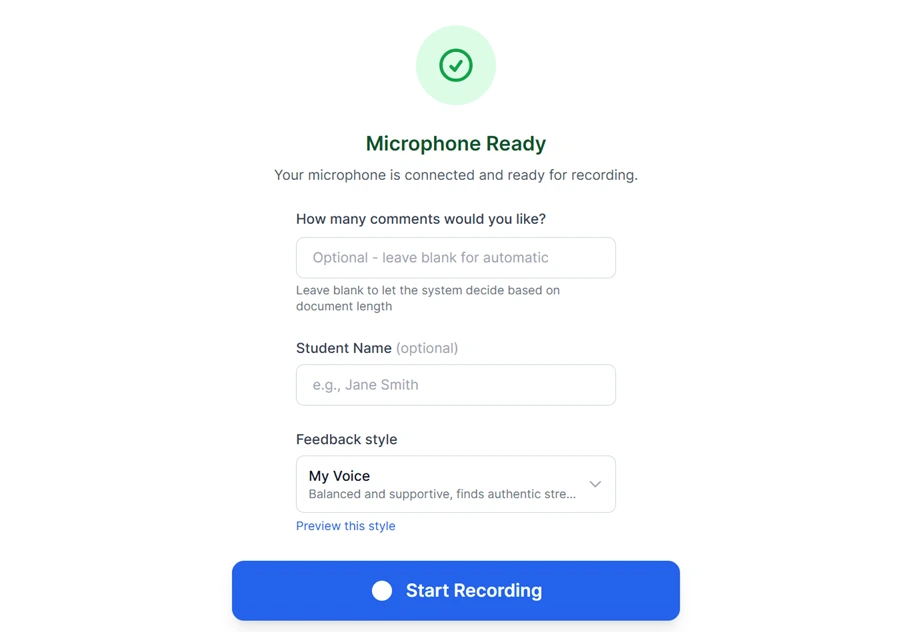
Generation three: the chat workflow, turned into an app. It asks who it's for and whose voice to use — then it's one button while I read.
The gatekeeper
A solo build still has a gatekeeper; it just doesn't have a face. Mine had three reasons to kill this. Student essays are children's writing, and my commentary is my unguarded voice saying things that were never meant for students, so a tool carrying both has to clear a much higher bar than hobby projects usually meet. I teach in China, where reaching half the internet's AI services is a coin-flip. I have also abandoned enough side projects to know that my enthusiasm is not evidence.
The trust problem produced the least flattering receipt in this story. In June I had the codebase audited, and one finding stung: the app's privacy page said documents were never saved, while the save feature was quietly storing essay text. The data sat in my own database behind per-user locks, and though I was the only "user", the page was wrong. I rewrote the copy the same day to say what the app actually does.
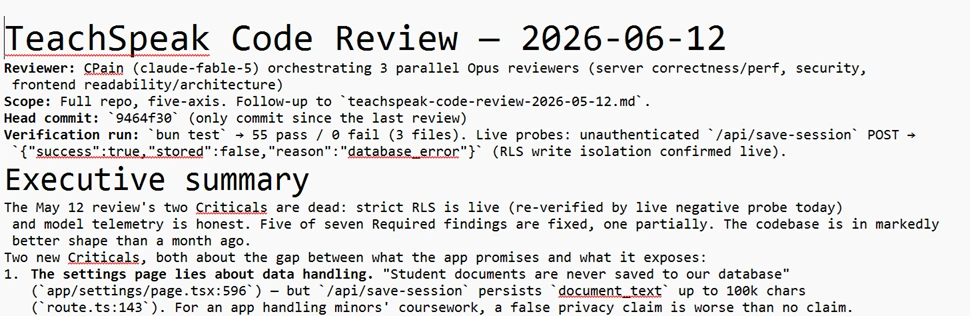
My own audit catching my own privacy page lying. Fixed the same day; kept the receipt.
Two years ago, this would never have made it past v1. Building something like that was just not justifiable: browser audio recording, a transcription service, a database with per-user isolation. That's a couple terms of evenings for a skilled hobbyist or a quarter for a product team, and I had neither. What changed is that I now build with Claude doing the typing on that side too. The cost of the idea dropped below the value of the itch, and the project moved from someday to started.
There is a fold in this worth pausing on. The technology that made the app buildable is the same technology the app is built to keep away from the marking. I will let Claude write my TypeScript all day. It does not get to decide what feedback each of my students needs to continue on their learning journey. The line isn't anti-AI or pro-AI; it runs through the middle of the word "workload", exactly where last week's post drew it.
One machine checking another
For the parts where I couldn't trust my own judgment, I made one machine check another. Before swapping transcription engines I ran the old and new engines side by side on the same audio and kept the comparison as a document, so that decision has something to be audited on. Twice, a month apart, I had the codebase audited against security, correctness and privacy — the second time by three independent review agents working in parallel — and treated the findings like tickets. That process is where the privacy-page catch came from, along with duller fixes you'd expect: rate limits, scrubbing for anything identifying, and so on.
The workflow document is the piece I'd point other teachers at, because it's the transferable move and it costs nothing. The day an AI process finally works, write down the exact requirements (better yet, speech-to-text them) while they're fresh: what the input must look like, what the output must contain, which mistakes you never want to see again. An afternoon of iterations becomes a one-page contract, and the contract is what turns a good single session into a pipeline. Nothing about that move needs a developer.
The build montage
The build itself is the least interesting part. One hundred and forty-nine commits between the end of January and early July got it launched, in sessions squeezed around a full teaching load. One hundred and sixty-nine and counting as I write this. In May the app started rejecting recordings with "Unsupported audio format" when the files were fine. The real error underneath was OpenAI refusing traffic from China-routed servers — "Country, region, or territory not supported" — and my error handling, matching on the word "unsupported", had filed this rejection as a file-type problem. The fix pins the transcription hop to servers in the United States. Full disclosure: my May version of that fix turned out not to work, and the piece that actually made it work only landed in July, discovered while checking rather than because anything visibly broke.
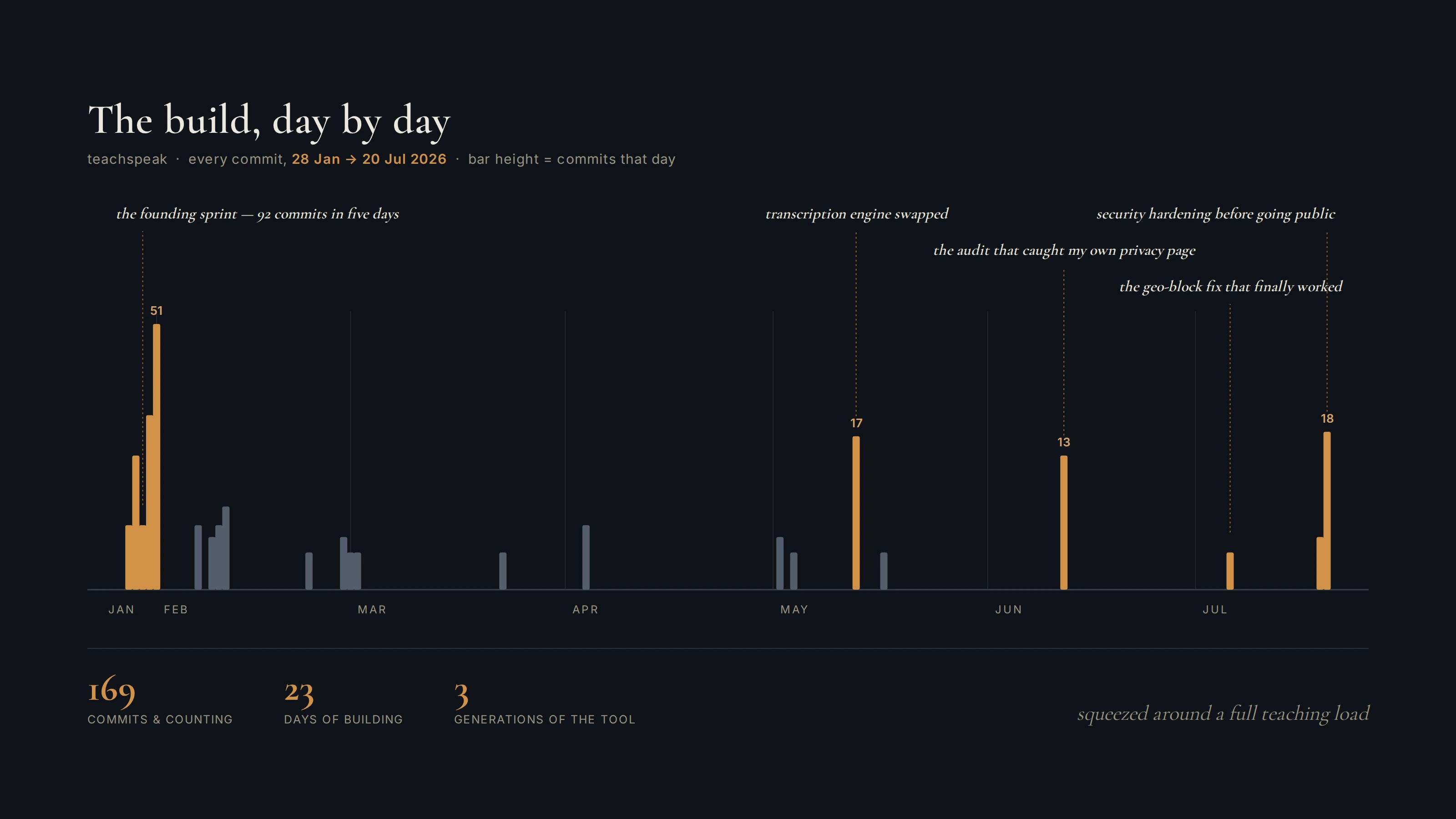
169 commits and counting, around a full teaching load. The build montage, still running.
The verdict
Now the verdict I promised, with hopefully no home-stadium advantage. Claude for Teachers missed this one. Grading and feedback with Claude for Teachers seems essentially the same as it was before Claude for Teachers. The product will happily comment on pasted student work, and that is precisely the version I've been avoiding, because paste-in feedback makes you the editor of comments you didn't write. A speak-while-reading pipeline that keeps the teacher the author of every comment does not exist in the product today. I did check, because the promise was to check rather than defend. The closest you can get is training regular Claude into the trick yourself, and that is the generation-two chat workflow I already replaced with the app, not a feature.
What I built isn't incredibly complex. It's likely something fairly straightforward for a proper coder. It's a dictaphone, a typist, and one rule about who does the reading. If Anthropic wanted this feature, the engineering is a sprint. What they'd have to ship with it is the restraint: a feedback tool whose demo is "the teacher still reads every essay" is a hard sell against a slide measured in minutes saved. That, more than any technical moat, is why I think the row is still empty — and it's the transferable lesson from the top of this post in its final form. If you are building tools with AI that you hope to share with others or even sell, you must take the time to understand what it is you offer, specifically you. What are your values? What is your expertise? In my case, I've built my teaching on giving effective feedback, and a pillar of that is recognising that if a student does not trust your feedback, it really doesn't matter how accurate, insightful, or probing it is.
What about student data?
The fair question, so here's the plain answer. Essays pass through the same category of third-party processing they already pass through when a school uses OneDrive or Turnitin, with one difference in this app's favour: it talks to the AI providers through their API tier, where the terms prohibit training on what passes through, so nothing is kept on their side. The only stored copy sits in the app's own database, isolated per teacher account, and I know exactly what it stores because I audited it. Two rules if you try it with real student work: strip the student's name first, because the tool doesn't need it, and check your school's data policy, because that call is yours, not mine. Sample essays work fine for testing it out.
I'll continue writing about tools I've made if I get the sense this sort of topic is useful. I'm always keen to discuss methods of feedback and how to improve, so shoot me a message on LinkedIn if you find this interesting or you'd like to try the app out.
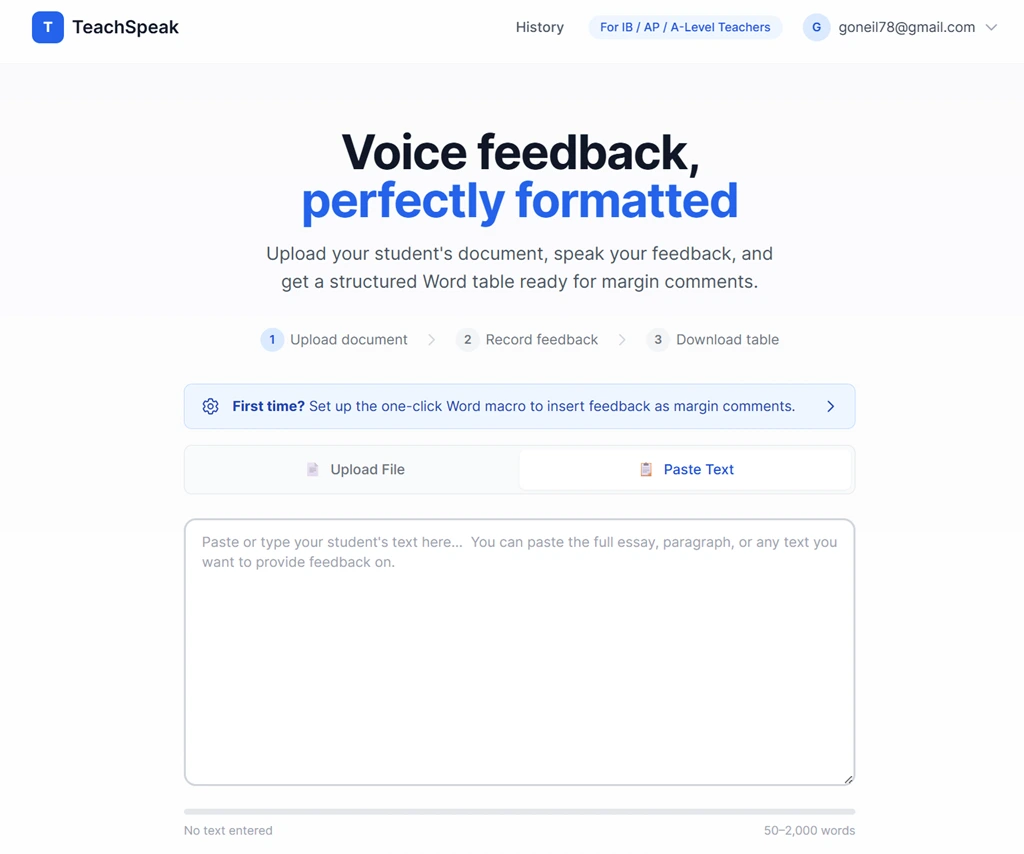
Live. The judgment never left the building; only the typing did.
The pipeline is live at teachspeak.foldingthoughts.com, and the margin card in last week's post came out of it: snark filtered, judgment intact.